Structural patterns define the way of assembling objects and classes into complex structures, keeping these structures flexible and efficient at the same time.
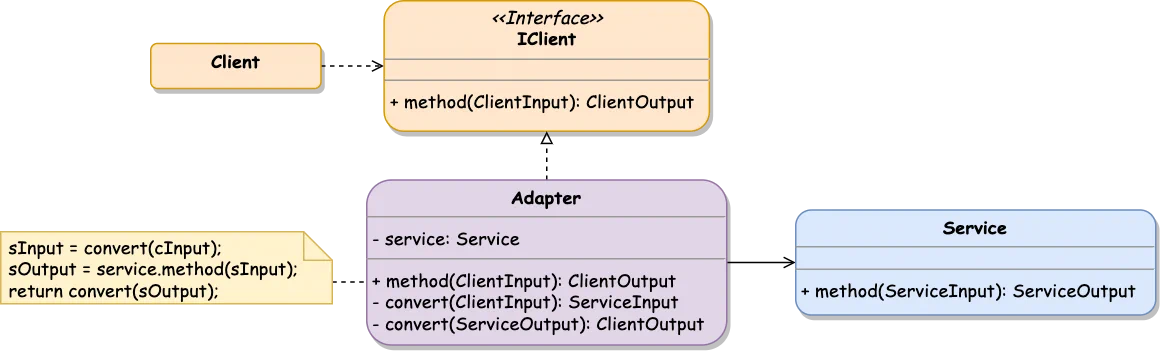
Adapter pattern connects objects with incompatible interfaces and allows them to collaborate with each other. The Adapter is a special object that converts the interface of one object to make it usable by other services.
Client contains business logic that uses Service functionality
IClient interface that describes how Client works
Service is a class that the Client can’t use directly because of incompatible interfaces
Adapter is a middleware class that proxies Service methods invocation from the Client and converts input/output parameters to the corresponding interfaces
When there is an existing system or third-party class that does its job well but has an incompatible interface and can’t be used directly from the target module
To integrate modern services with a legacy codebase
For reusable classes that must be consumed by the future modules whose interfaces are unknown in advance
// Client works with strings
interfaceIClient{method(input: string):string;}// Service works with numbers
classService{publicmethod(input: number):number{returninput**2;}}classAdapterimplementsIClient{privateservice=newService();// allows to call Service.method with a string argument
publicmethod(input: string):string{constserviceInput=this.convertInput(input);constserviceOutput=this.service.method(serviceInput);constclientOutput=this.convertOutput(serviceOutput);returnclientOutput;}privateconvertInput(input: string):number{returnNumber.parseInt(input,10);}privateconvertOutput(output: number):string{returnoutput.toString();}}constadapter=newAdapter();constresult=adapter.method('64');
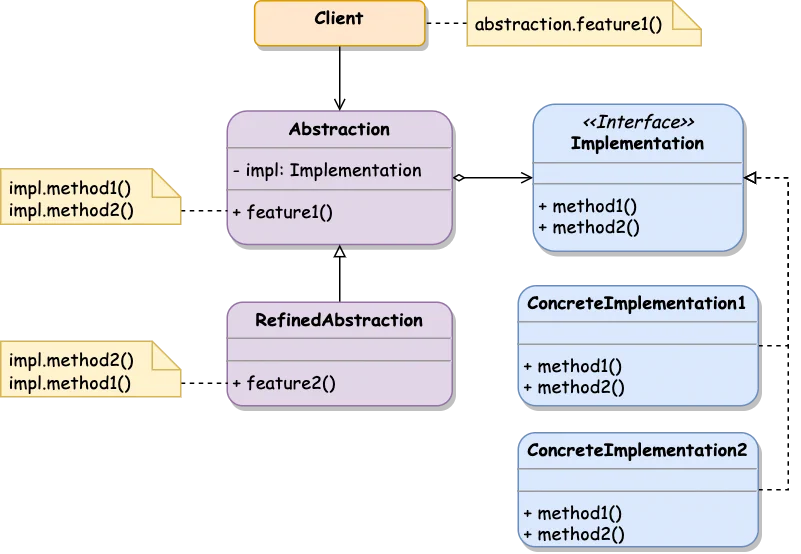
Bridge pattern is used to split a large class (or classes) into separate hierarchies (abstractions and implementations) that can be managed independently.
If the object has some additional characteristic, it can be extracted into a separate class hierarchy instead of extending the existing classes. The old and new classes will be connected via a bridge represented by a common interface.
The Bridge pattern consists of abstraction and implementation:
Abstraction is a high-level control interface describing the underlying entities.
Implementation layer provides a logic that conforms to Abstraction interfaces.
Abstraction provides high-level control logic that relies on the Implementation
Implementation declares an interface that is common for all concrete implementations. An Abstraction can communicate with the ConcreteImplementation only over this interface
Client links the Abstraction with a ConcreteImplementation and works with its methods
RefinedAbstraction (optional) may provide various control logic flows
interfaceImplementation{method1():void;method2():void;}classConcreteImplementation1implementsImplementation{publicmethod1():void{console.log('Method1 from Implementation1 is called');}publicmethod2():void{console.log('Method2 from Implementation1 is called');}}classConcreteImplementation2implementsImplementation{publicmethod1():void{console.log('Method1 from Implementation2 is called');}publicmethod2():void{console.log('Method2 from Implementation2 is called');}}classAbstraction{constructor(privateimplementation: Implementation){}publicfeature():void{this.implementation.method1();this.implementation.method2();}}constimplementation=newConcreteImplementation2();constabstraction=newAbstraction(implementation);abstraction.feature();
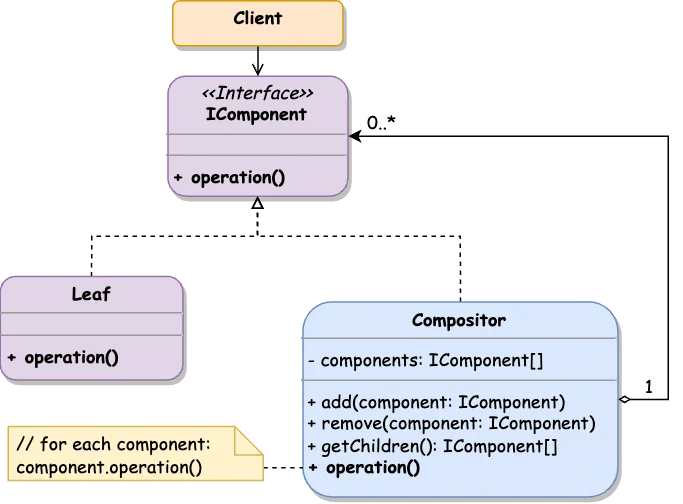
Composite composes objects into tree structures and allows working with them as if they were individual objects. This pattern makes sense only when the system model has a tree structure.
The idea is that each object in a tree can manage its nested objects via a common interface. Once a method is called on a root object, it is passed down the tree to get the result by examining all the underlying entities.
Usually, Leaf primitive components do the actual work when Composite complex containers delegate this work to their sub-elements.
Compositor class is unaware of its concrete classes and works with them through a common interface.
The Component might contain the reference to its parent element in the tree, which should be set once the component is added to the tree.
The Composite container can cache the results of its nested component operations to improve the performance of the tree traversal. In this case, any child component update should reset the cache of its parent containers.
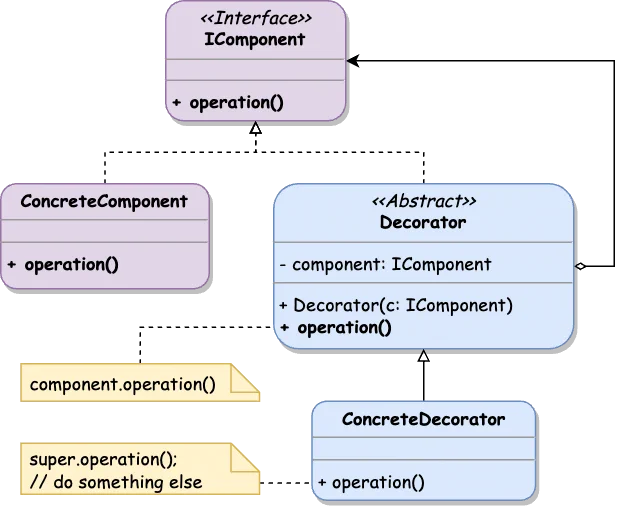
Decorator allows attaching new behavior to objects by wrapping them into a special method that contains this additional functionality.
Decorator pattern is designed around the wrapper object, which is linked with some target one and delegates all the invocations to it. The wrapper object has the same methods and interfaces as the wrapped one.
interfaceIComponent{operation():void;}classConcreteComponentimplementsIComponent{// decorated class
publicoperation():void{console.log('Component\'s operation() called');}}abstractclassDecoratorimplementsIComponent{// base decorator
constructor(privatecomponent: IComponent){}publicoperation():void{console.log('Decorator\'s operation() called');returnthis.component.operation();}}classConcreteDecoratorextendsDecorator{// override parent class method with additional logic
publicoperation():void{console.log('ConcreteDecorator\'s operation() called');returnsuper.operation();}}constcomponent=newConcreteComponent();constdecoratedComponent=newConcreteDecorator(component);constdoubleDecoratedComponent=newConcreteDecorator(decoratedComponent);doubleDecoratedComponent.operation();/** Result:
* ConcreteDecorator's operation() called
* BaseDecorator's operation() called
* ConcreteDecorator's operation() called
* BaseDecorator's operation() called
* Component's operation() called
*/
Flyweight pattern minimizes memory usage by sharing common data between multiple similar objects instead of storing all the details in each object.
Object state consists of the following parts:
Intrinsic state - the constant data that other objects can only read but not modify.
Extrinsic state - the data that can be set and accessed by other objects.
Flyweight suggests extracting the extrinsic state from the object and passing it to specific methods which rely on it. Only the intrinsic state should be stored in the object to be reused in different contexts. As a result, the system will have fewer flyweight objects as they only differ in the intrinsic state.
The object that only stores an intrinsic state is called a flyweight.
The extrinsic state can be stored in a container object or a separate context class aggregating these properties and having a reference to the particular flyweight object.
Flyweight object has to be immutable and does not allow to change its state via setters and/or public properties.
Usually, the flyweight objects management is implemented via a factory method that applies an intrinsic state as an argument and returns the desired object (newly initiated or already existing in the factory’s cache).
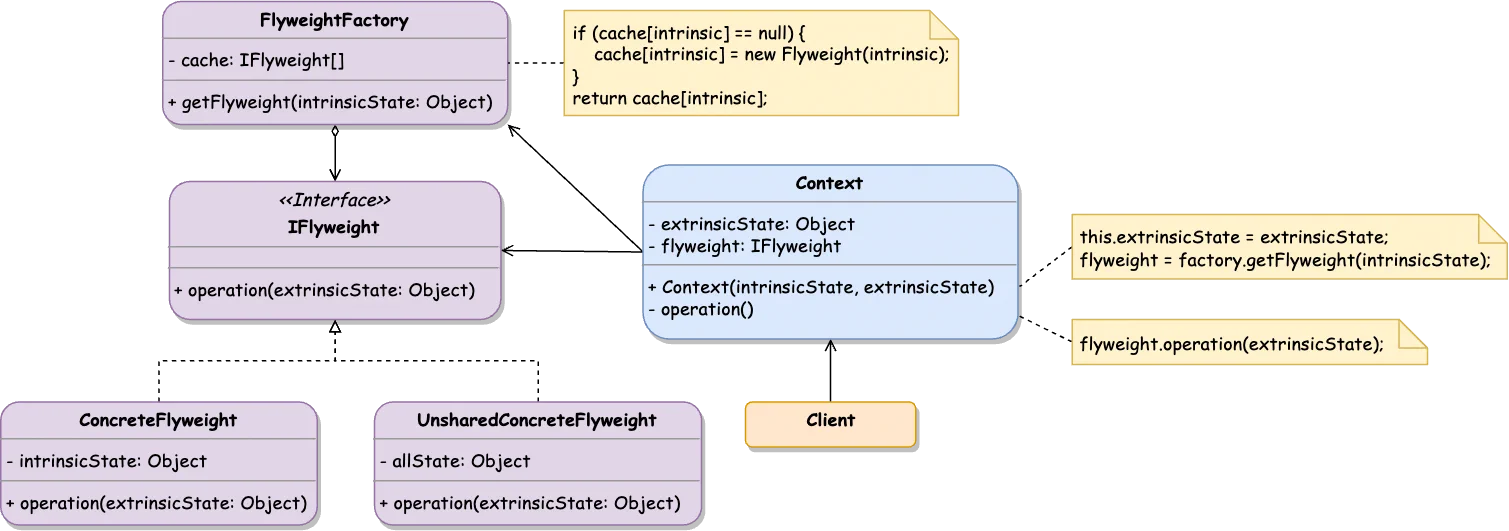
Flyweight interface declares the part of the object state that can be shared (intrinsic state) and the operations depending on a unique external state (extrinsic state)
ConcreteFlyweight class implements the Flyweight interface and represents concrete flyweight objects
UnsharedConcreteFlyweight is an optional implementation of the Flyweight interface that contains both intrinsic state_ and extrinsic state
FlyweightFactory stores already created flyweight objects or initializes new ones based on a shared portion of data (intrinsic state)
Context class stores a portion of unique data (extrinsic state) along with the corresponding ConcreteFlyweight object
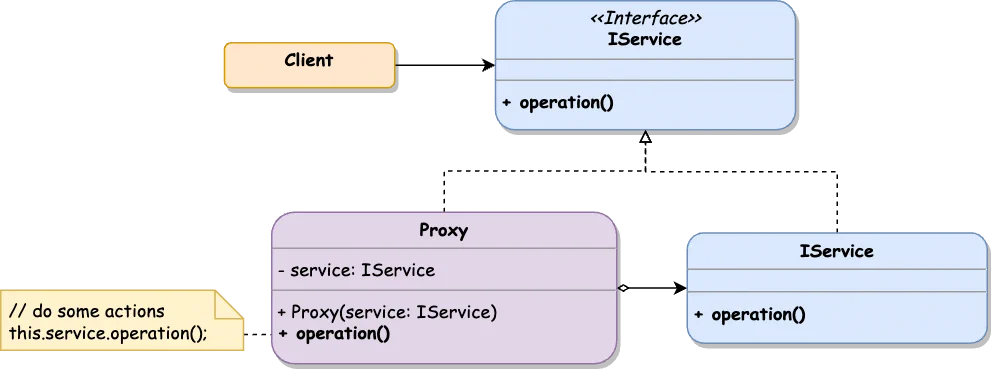
interfaceIService{operation():void;}classServiceimplementsIService{// original service
publicoperation():void{console.log('Origin operation() invocation');}}classProxyimplementsIService{// service proxy
constructor(privateservice: IService){}operation():void{console.log('Before operation() called');constresult=this.service.operation();console.log('After operation() called');returnresult;}}constservice=newService();constproxy=newProxy(service);proxy.operation();