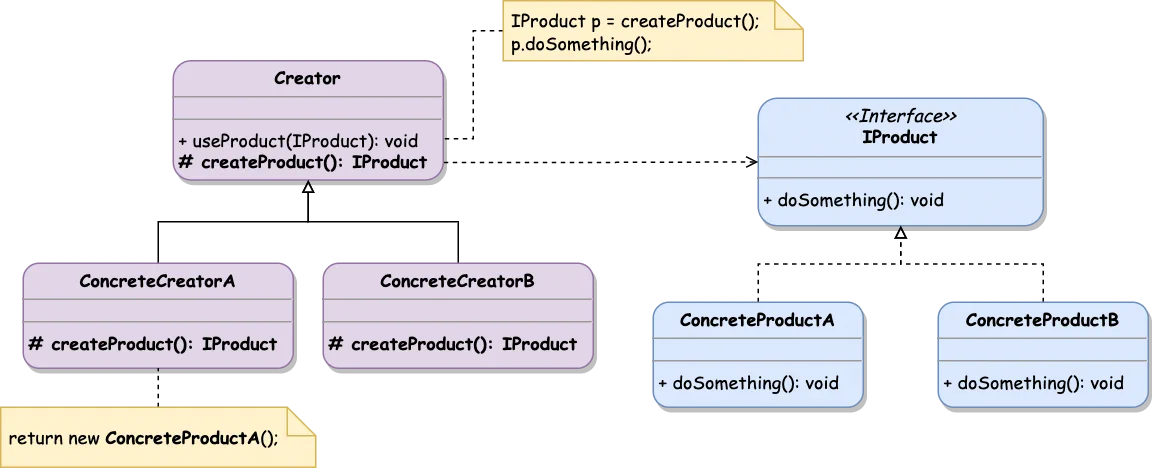
Creational patterns represent how objects or groups of related objects are initialized. They help to make the system independent of how the objects are created and composed.
Creational patterns encapsulate the information about concrete classes used in a system and hide initialization details. Instead of the classes themselves, the system relies on their interfaces.
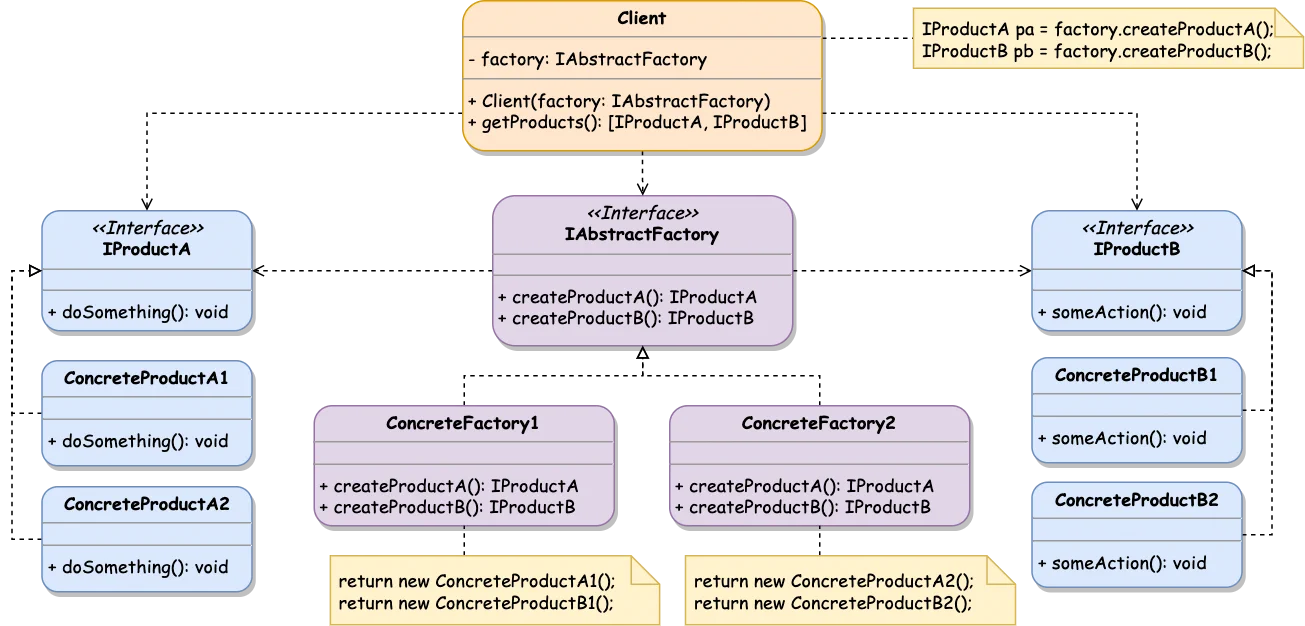
Abstract Factory allows creating the group of related objects without specifying their concrete classes. This factory produces a family of products with a particular variant.
The example below demonstrates UI elements (products) family presented via platform-specific variants:
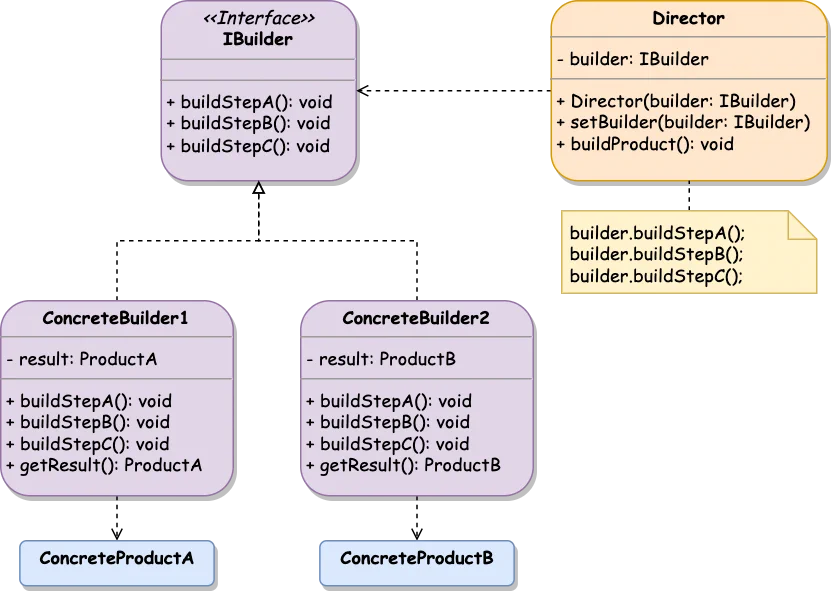
Builder lets you construct complex objects step by step. It allows to create different representations of the object using a construction code instructions.
classConcreteProductA{constructor(publicparam1=0,publicparam2=false,publicparam3=''){}}classConcreteProductB{constructor(publicoption1=1,publicoption2=''){}}interfaceIBuilder{buildStepA():void;buildStepB():void;buildStepC():void;}classConcreteBuilder1implementsIBuilder{privateresult=newConcreteProductA();publicbuildStepA():void{this.result.param1=1;}publicbuildStepB():void{this.result.param2=true;}publicbuildStepC():void{this.result.param3='Built with Concrete Builder 1';}publicgetResult():ConcreteProductA{returnthis.result;}}classConcreteBuilder2implementsIBuilder{privateresult=newConcreteProductB();publicbuildStepA():void{this.result.option1=2;}publicbuildStepB():void{this.result.option2='Built with Concrete Builder 2';}publicbuildStepC():void{}// just ignore this step :)
publicgetResult():ConcreteProductB{returnthis.result;}}classDirector{privatebuilder: IBuilder|null=null;publicsetBuilder(builder: IBuilder){this.builder=builder;}publicbuildProduct() {this.builder?.buildStepA();this.builder?.buildStepB();this.builder?.buildStepC();}}
The Client (or system code) is not receiving the built object directly from the Director. Instead, once the Director has finished building operations, the Client should take the result object from the ConcreteBuilder.
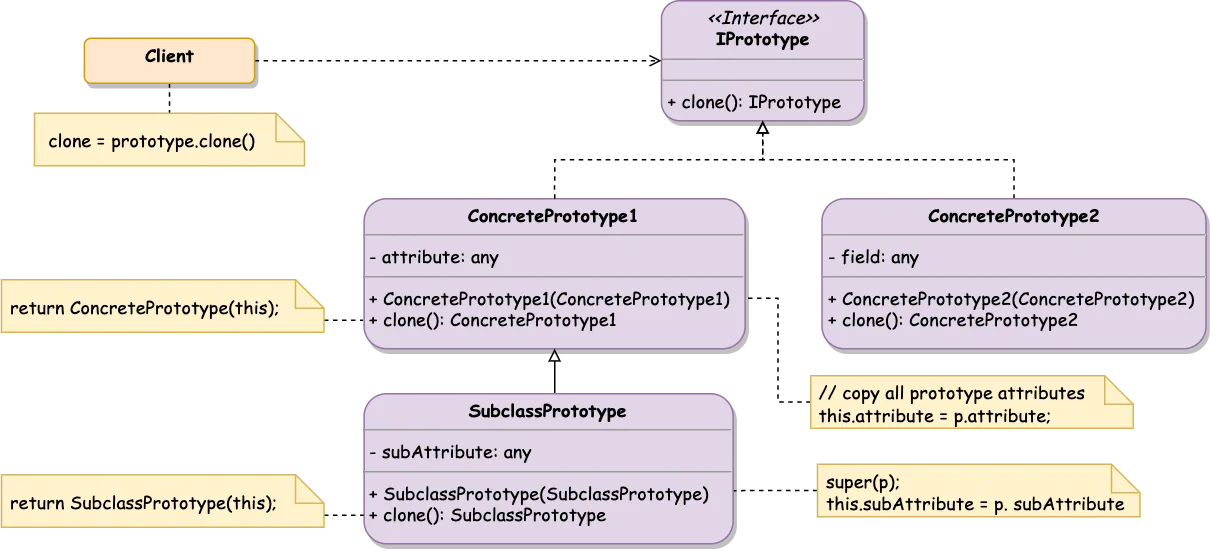
Prototype pattern allows to clone existing objects without dependencies on their classes. This pattern delegates the cloning process to the actual object being cloned.
To make an object a prototype, it has to provide the clone() method that creates an object of the current class and copies the state (methods, public/protected/private fields) to the newly created instance.
ConcretePrototype implements a cloning method from Prototype interface where coping current’s object state in a new object instance and dealing with the corresponding edge cases
Client makes a copy of any object that conforms Prototype interface
When the code shouldn’t depend on the concrete class of the cloned object.
To reduce the number of subclasses that only differ in the way they initialize objects.
To avoid building complex inheritance chains and factories for making various product variations.
When the object can have a limited number of states, it might be simpler to create a corresponding amount of prototypes and clone them instead of reproducing the object state from scratch.
Prototype’s clone() implementation can be tricky if the object has circular dependencies or non-primitive attributes (all the referenced objects need to be cloned as well).
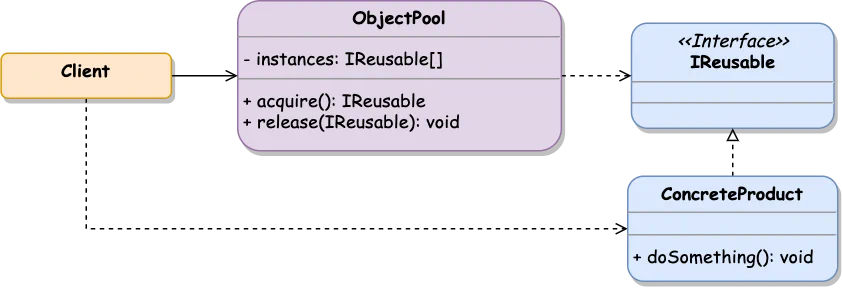
The Object Pool pattern is designed to reuse the already initiated objects rather than allocating and destroying them on demand. It’s most efficient when object initialization is time-consuming, and the existing allocated objects can be reused (for example, database connection).
Object Pool creates a set of objects used by the client logic for a relatively short period of time. When a client needs the object, it takes that from the pool. After the object is no longer needed, it is returned to the pool for future usage by other system components. If the request object does not exist in the pool, it should be initialized.
📒
In computer science, a pool is a collection of resources that are kept, in memory, ready to use, rather than the memory acquired on use and the memory released afterward.
classConcreteProduct{constructor(){console.log('Concrete Product is initialized');}}classObjectPool{privateinstances: ConcreteProduct[]=[];publicacquire():ConcreteProduct{if(this.instances.length>0){// removes the first array item and returns it
returnthis.instances.pop();}// initializing the new instance
returnnewConcreteProduct();}publicrelease(concreteProduct: ConcreteProduct):void{this.instances.push(concreteProduct);}}constobjectPool=newObjectPool();constconcreteProduct1=objectPool.acquire();constconcreteProduct2=objectPool.acquire();console.log('Are products the same?',concreteProduct1===concreteProduct2);objectPool.release(concreteProduct1);constconcreteProduct3=objectPool.acquire();console.log('Are products the same?',concreteProduct1===concreteProduct3);